Too long to read?
Let ChatGPT summarize this Smart Salary article for you in seconds.

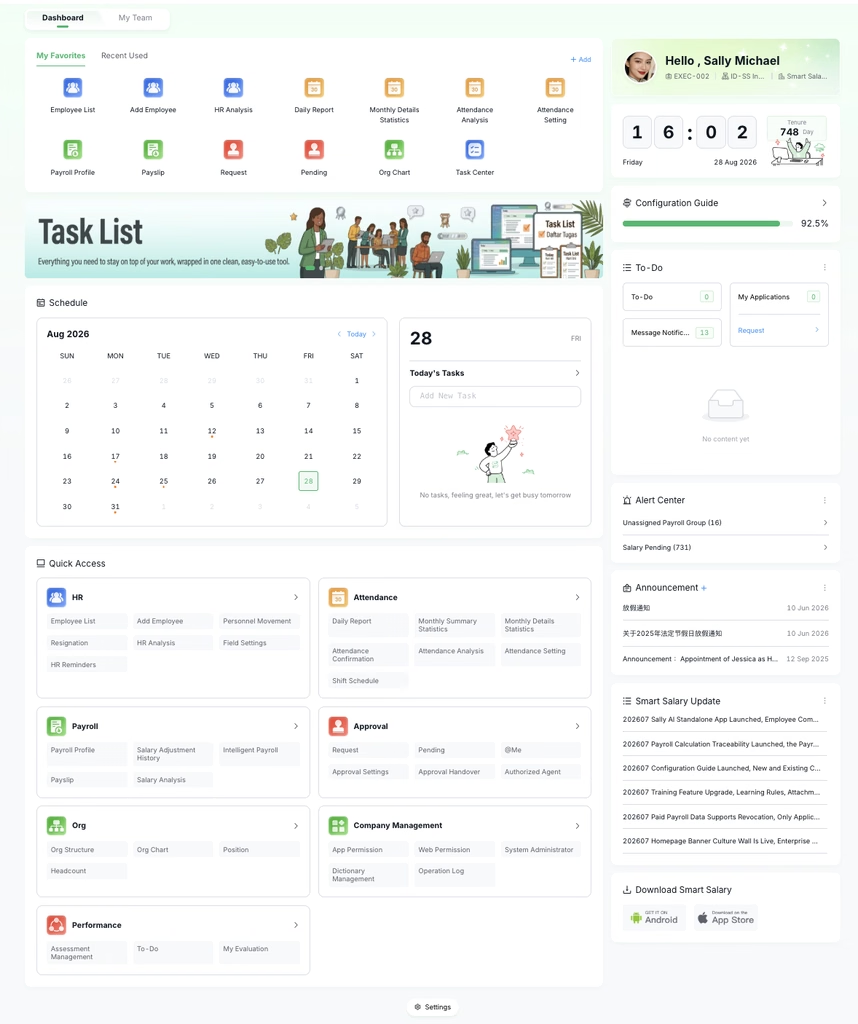
The 2026 05 update introduces an enhanced, workflow-centric dashboard for the Smart Salary admin system. By evolving the interface to prioritize HR’s most common daily workflows, administrators can significantly reduce navigation time and execute tasks with greater efficiency especially for HR Administrators, HR Managers, System Operators.
This article outlines the upgraded features and provides actionable strategies for optimizing daily HR operations within the platform.
Dual-Tab Layout: Separating Action and Insight
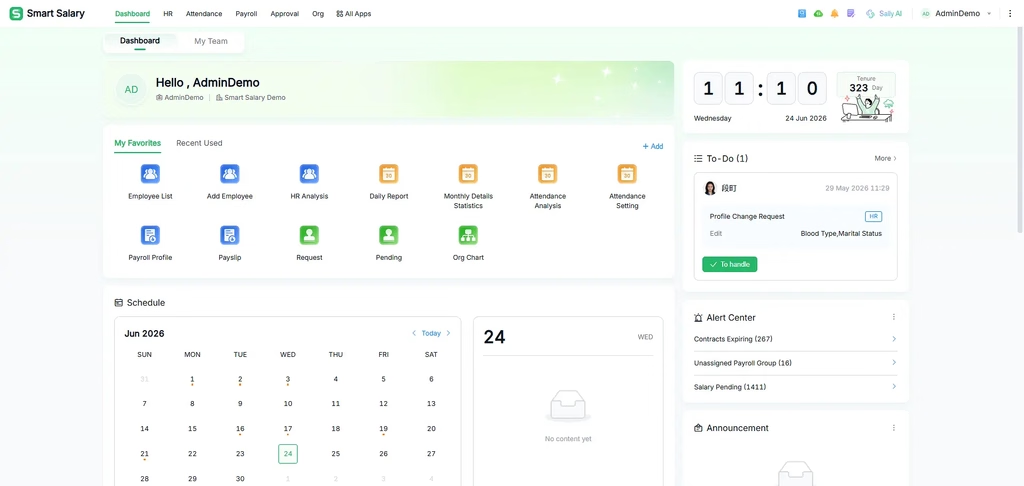
The homepage now utilizes a dual-tab architecture to separate direct operational tasks from macro-level team monitoring, ensuring a focused and clutter-free experience.
Ready to see Smart Salary in action?
Book a free demo and see how it fits your team’s payroll.
The Workspace Tab (Operational Command Center)
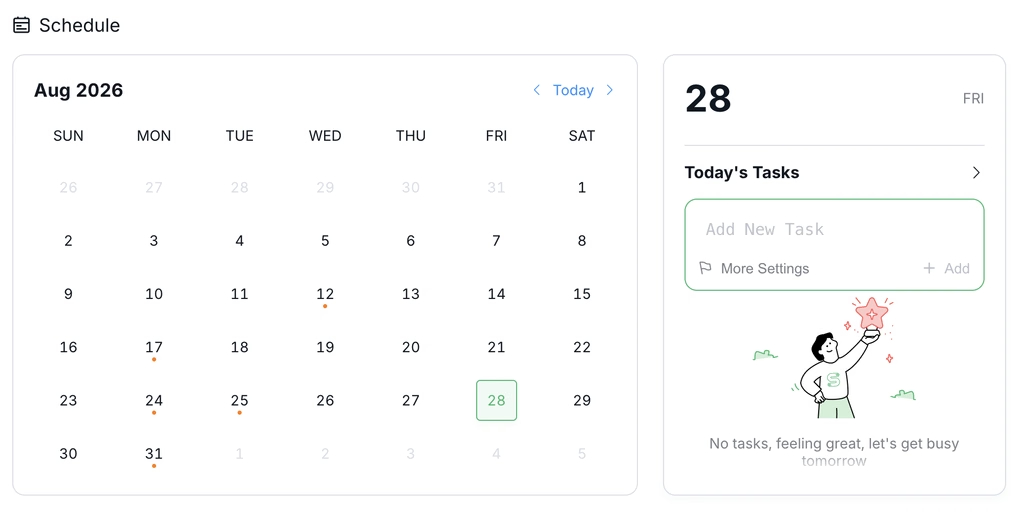
This tab centralizes the most frequently utilized HR functions, serving as the primary hub for daily execution.
- Core Components: Features a personalized welcome section, time widget, Alerts, Company Announcements, and Schedule. It provides immediate access to high-frequency actions like the Employee Directory, Onboarding Management, and Payroll Profiles.
- Optimization Strategy: Utilize the Workspace tab to verify session details instantly and monitor critical company-wide updates. By keeping alerts and schedules on the main screen, administrators can stay informed without navigating away from their primary workspace.
The My Team Tab (Data and Monitoring)
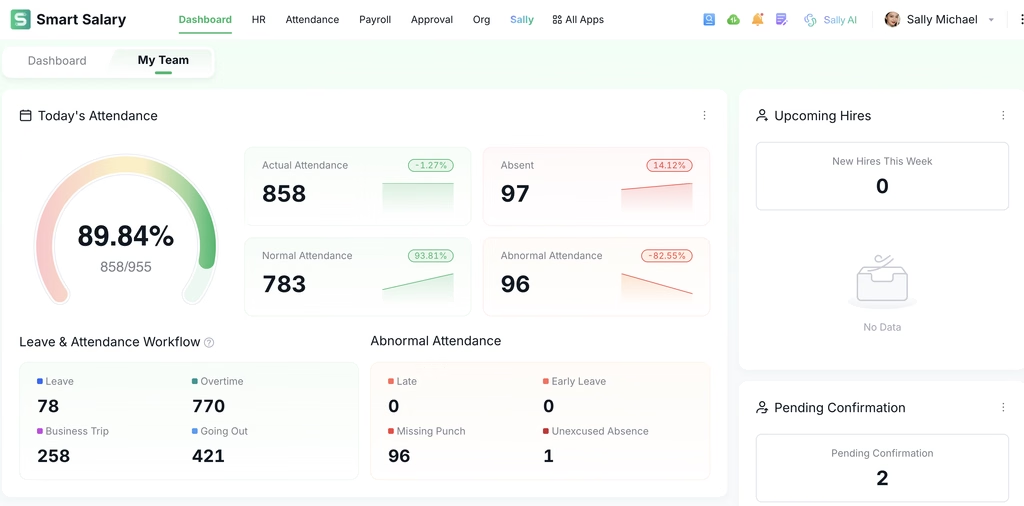
This tab aggregates key business data concerning attendance, team operations, and employee care.
- Core Components: Centralized dashboards displaying team-related data and performance metrics.
- Optimization Strategy: Incorporate this tab into morning check-ins. Managers can quickly spot attendance abnormalities, monitor HR metrics, and identify areas requiring employee follow-up or care initiatives without needing to generate manual reports.
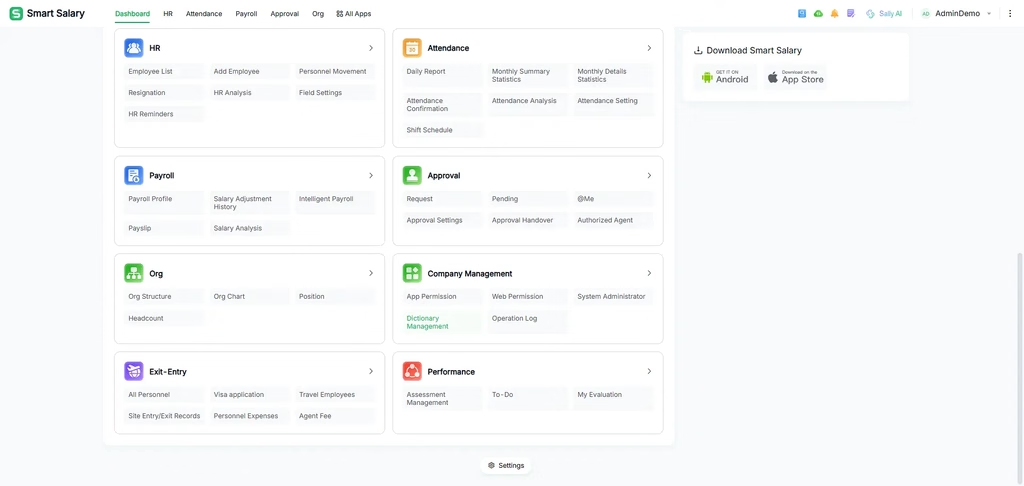
The updated workspace structures quick access entries into distinct business modules. This categorization allows users to locate functions based on contextual work scenarios rather than searching through layered menus.
The eight primary business modules are organized as follows:
- Employees: Employee Directory, Onboarding/Offboarding Management, HR Changes, HR Analytics.
- Leave & Attendance: Daily/Monthly Statistics, Shift Scheduling, Attendance Confirmation/Analysis.
- Payroll: Payroll Profiles, Smart Payroll Calculation, Payslips, Salary Adjustment Records.
- Approvals: Initiate Requests, Pending Tasks, Delegation Authorization, Approval Settings.
- Organization: Organizational Structure, Organization Chart, Headcount Management.
- Enterprise Management: App Permissions, Admin Permissions, Operation Logs.
- Immigration
- Performance Management
Optimization Strategy: Administrators should familiarize themselves with these eight top-level categories. By navigating by module rather than searching for individual tools, users build a more efficient, instinctual workflow.
Centralized Task Management via the To-Do Center
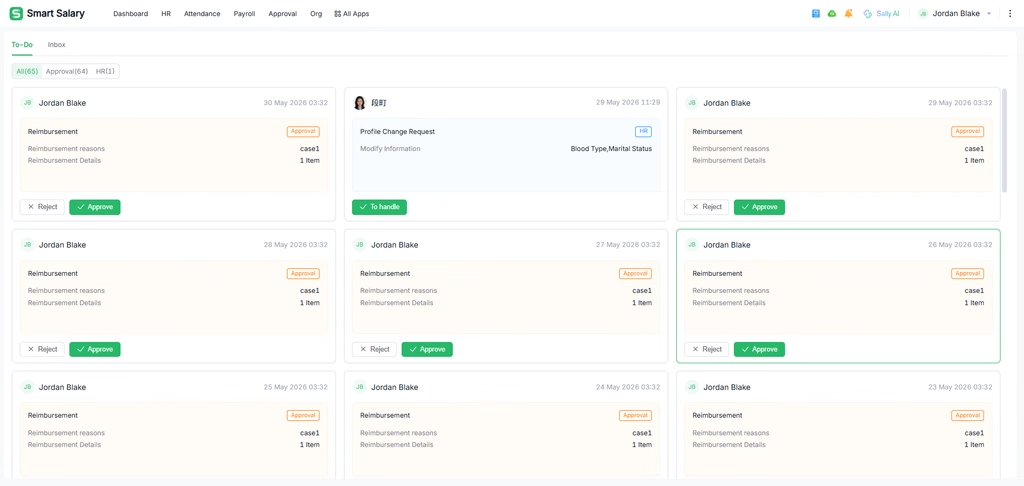
The newly introduced To-Do Center acts as a unified clearinghouse for all pending actions, accessible directly via homepage task cards or the top message entry.
- Cross-Platform Consistency: The task scope (Approval Tasks and Employee Information Review Tasks) is fully aligned with the mobile app. Administrators can transition seamlessly between web and mobile interfaces without losing track of pending items.
- Advanced Filtering: To manage high volumes of tasks, the center includes robust filtering capabilities (All Tasks, Approvals, Performance Reviews, HR Services) and search functionality (by employee name, title, or status).
- Batch Processing Capability: Administrators can select multiple routine approval requests and process them simultaneously.
- Optimization Strategy: Reserve batch processing for standard, low-risk requests (e.g., standard time-off). For complex items, administrators can still open individual task cards to review applicant details, request context, and current status before executing an approval.
Recommended Daily HR Workflow
To maximize the efficiency of the upgraded Smart Salary dashboard, administrators are encouraged to adopt the following standard operating procedure upon logging in:
- System and Alert Audit (Workspace Tab): Review the Alert Center, Company Announcements, and Schedule immediately upon login to capture any urgent organizational updates or policy shifts.
- Task Queue Processing (To-Do Center): Access pending tasks. Utilize filters to group similar requests and apply batch processing to clear routine approvals, minimizing the administrative backlog early in the day.
- Operational Monitoring (My Team Tab): Scan aggregated team data for unexpected absences, missing punches, or required employee care interventions.
- Focused Execution (Quick Access Modules): With urgent items cleared, utilize the specific business modules (e.g., Payroll or Performance Management) to conduct deep-focus, task-heavy HR duties without interface friction.
Next Steps and Additional Resources
Exploring these enhanced features firsthand is the best way to master the updated Smart Salary workspace. The interface is built to adapt to your operational rhythm, so we encourage you to log in and set up your preferred module views today.
If you need further assistance or want to dive deeper into specific functions, explore our comprehensive support materials:
- Smart Salary Video Tutorials & Walkthroughs
- HR Admin Knowledge Base & FAQs
- Contact the HR Systems Support Team
We are committed to continuously improving your administrative experience. Please reach out through the support link above if you have any feedback or require personalized training for your team.

Diego Ronaldo Immanuel Tambunan is a trilingual Presales & BD Operations Manager at Smart Salary, working across English, Mandarin Chinese, and Indonesian. His expertise spans HR technology, sales operations, and collaboration between Indonesian and Chinese teams. A Mandarin educator, emerging leader, and advocate for cultural exchange, he is committed to expanding opportunities through education, empowering future leaders, and leading by example through service.
✨ Ask AI which HR & payroll platform is best. See what it says!